
How a question becomes speech
Cloudy Reader cleans up pasted text, builds a spoken script, and reads it with a voice on your Mac. The app changes how a word sounds, never which word is said.
From pasted text to sound
Section titled “From pasted text to sound”The app runs five steps each time you start a reading. Only step 3 can use the network, and only to look up names.
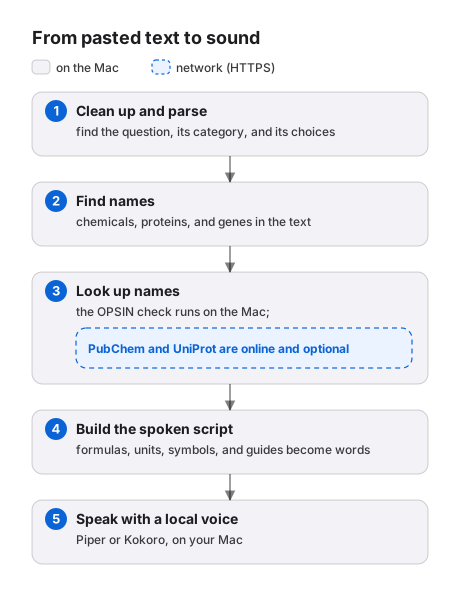
- Clean up and parse. The app fixes PDF leftovers and finds the header, number, category, format, stem, choices, and answer line. It takes each pronunciation guide out of the text.
- Find names. Name detection marks formulas and chemical, gene, and protein names in the stem and the choices. It also scans the answer line when Read answer line is selected.
- Look up names. The OPSIN check parses systematic chemical names on your Mac. With Online lookups selected and offline mode off, the app also asks PubChem about other chemical names and UniProt about protein and gene names.
- Build the spoken script. The app applies your guides first, then fractions, units and symbols, formulas and notation, and the lexicon. This step also sets the silent pause after each part of the question.
- Speak. A voice engine turns the script and any exact pronunciations into audio, and the app plays the audio. The voice you chose decides which engine runs.
Click Spoken script to open the view of the words that step 4 builds. The view does not show guides or exact pronunciations, because they travel with a word and not as text. See Question format and reading order for the order of the parts and every pause.
How a word sounds, never which word
Section titled “How a word sounds, never which word”The app follows one rule in every step: lookups and the lexicon decide how a word sounds, never which word is said. The formula NaHCO3 becomes “N A H C O three” in the spoken script. It never becomes “baking soda”.
The figure shows the spoken script for the sample question in Get started.
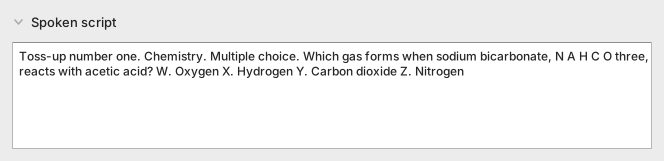
The script adds the spoken header, such as “Toss-up number two.”, and it writes formulas, units, and symbols as words. It never replaces a term with a different term. The only way to replace the words is a say-as guide or a spell guide that you write yourself.
How formulas and symbols are read
Section titled “How formulas and symbols are read”The app works in a fixed order. It sets your guides and systematic names aside first, then marks fractions on the text as you pasted it. Units and symbols come next, then formulas and notation, and the lexicon comes last.
A chemical formula is spelled letter by letter, and its digits become number words. H2O is “H two O”, C6H12O6 is “C six H twelve O six”, and Fe3+ is “F E three plus”. A plain number outside a formula stays a digit, and the voice reads it.
The app treats a token as a formula when it has:
- An atom count, as in
H2O. - A charge, as in
Fe3+. - Two or more element symbols in mixed case, as in
NaCl.
A few all-caps formulas, such as CO and HF, are also spelled. Words that are also element symbols stay words, so “He said no.” and “As it cools” are unchanged.
Next to a plus sign or an arrow, the same letters are spelled. The equation 2 Na + Cl2 → 2 NaCl is read as “2 N A plus C L two yields 2 N A C L”.
Units, powers of ten, Greek letters, and symbols become the words a person says:
5 m/sis “5 meters per second”.6.02 × 10^23is “six point oh two times ten to the twenty-third”.x ≤ 5is “x is less than or equal to 5”.
The app reads a written fraction as a fraction: 1/7 is “one seventh” and 3/4 is “three quarters”. It leaves a slash alone when the text is not a plain fraction of whole numbers. 1.5/2 and the date 3/9/2024 keep their slash, and the unit step reads m/s as “meters per second”.
Hard words and chemical names
Section titled “Hard words and chemical names”The lexicon is a built-in table of 553 hard science words, such as abiotic, acetaldehyde, allele, and zygote. Each entry holds an exact pronunciation. The app matches whole words and ignores case.
For a systematic chemical name such as 2-methylpropan-1-ol, the app builds the sound from the parts of the name. A table of 153 name parts supplies the sounds, and the name gets one main stress. The app does this only when the OPSIN check parses the name and the table knows every part.
OPSIN runs on your Mac with a Java runtime that is part of the app, so the check works offline. Without a lexicon entry, a guide, or a checked name, the voice engine decides how a word sounds. The Spoken script view shows a checked name as written, because its pronunciation travels with the word and not as text.
What online lookups do
Section titled “What online lookups do”With Online lookups selected and offline mode off, the app asks PubChem about a chemical name that the OPSIN check did not parse. It asks UniProt about a protein or gene name. The app never looks up a formula or a name that the lexicon already knows.
A lookup never changes what you hear. The script builder uses only the OPSIN result and ignores the answers from PubChem and UniProt. A lookup adds network traffic and, when a service is slow, up to 2.5 seconds of waiting before the reading starts.
The app asks about each name once per reading and keeps the answers in the lookup cache. It keeps a name found for 30 days and a name not found for 1 day.
The window shows nothing about lookups, not even a warning when one fails, and the reading goes on. See Privacy for what a lookup sends and how to turn lookups off.
Your guides come first
Section titled “Your guides come first”A pronunciation guide is text in square brackets after a word, such as Krebs cycle [KREBZ SY-kul]. The app takes the guide out of the text and sets the word aside before any other step can change it. The unit, formula, acronym, and lexicon steps skip that word, so a guide wins over the lexicon.
A phonetic respelling covers every occurrence of its word in the same part of the question. A say-as guide replaces one occurrence of its expression in the same part: the first one. Put the guide after the first occurrence.
A guide for a whole expression wins over the app’s own reading of its parts. For example, 4 2/7 [4 and two-sevenths] is read as “4 and two-sevenths”.
If the app cannot use a guide, it says the word plain and shows a warning in the status bar. It never guesses at a sound.
See Pronunciation guides for the syntax and every warning.
Why a repeated question starts faster
Section titled “Why a repeated question starts faster”The app saves the audio of every reading in the audio cache. Each file has a key that covers the spoken script, its pauses and pronunciations, the voice, and the version of the voice engine. When the key matches a saved file, the app plays that file and skips speech synthesis.
On a Mac with an M2 Ultra chip, finding a saved reading took about 0.01 seconds. Rendering a reading that was not saved takes longer, and the time depends on the voice engine: see Voices and voice engines for measured times. Repeat always plays the saved file of the last reading.
A different voice, a different guide, or a different script gives a different key, so the app renders the reading again. Turning on Read answer line adds the answer to the script, so it also gives a different key. The audio cache has no size limit and no cleanup: see Files, settings, and limits.
The first reading after the app opens is slower for another reason. The app loads its name-detection model once, and every later reading reuses it.
Known limits
Section titled “Known limits”These cases give results you may not expect. The spoken script is the same for every voice, and the examples show what a Piper voice says.
- A slash that touches a letter, π, or a root sign stays a slash.
4/3πr3becomes4/3 pi r cubedin the spoken script, and a Piper voice says “four slash three pi r cubed”. - An en-dash range keeps its dash. A Piper voice says
5–10 gramsas “five ten grams”, with no “to”. - A
<or>needs a space on each side. The app leavesx<3alone, and a Piper voice says “x three”. - A base of two or three letters before
^is spelled.sin^2θbecomess i n squared theta. - Capital
COis spelled even in shouted text.NO EVENT SHALL CO OCCURbecomesNO EVENT SHALL C O OCCUR. - A possessive loses a lexicon entry with a Piper voice, and the status bar shows a warning.
Avogadro's numberis an example. See Status messages. - You cannot add words to the lexicon. A guide in the text is the only way to fix a word.
- The question box takes plain text. The app cannot read an image of a question or a drawn equation.