
Privacy
Summary
Section titled “Summary”Cloudy Reader makes speech on your Mac and has no telemetry, analytics, crash reports, or update check. It uses the network for two features: name lookups, which are on by default, and the voice download of missing voices. A lookup sends one detected name, never the text around it, and offline mode stops both features.
What stays on your Mac
Section titled “What stays on your Mac”Parsing, name detection, the OPSIN check, the pronunciation rules, speech synthesis, and playback run on your Mac. The name-detection model and a Java runtime for the OPSIN check are part of the app.
The audio never leaves the Mac. The only text from your questions that can leave it is the single name in a lookup.
What uses the network
Section titled “What uses the network”Two features open a network connection, and no other part of the app does. Name lookups are on by default: Online lookups is selected when you first open the app.
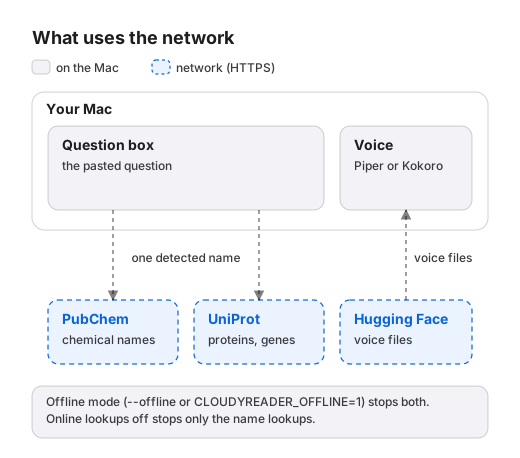
A name lookup runs only when Online lookups is selected and offline mode is off. It skips a name that the lexicon or the lookup cache already holds.
The voice download starts at launch and runs only when a pinned voice file is missing and offline mode is off. The table lists each request.
| Feature | Host | Used for | What it sends |
|---|---|---|---|
| Name lookup | pubchem.ncbi.nlm.nih.gov |
A chemical name that the OPSIN check did not parse | The name, in the URL path |
| Name lookup | rest.uniprot.org |
A protein or gene name | The name, as the query value |
| Voice download | huggingface.co, then any HTTPS host that it redirects to |
A voice file that is missing | One GET request for each file |
What a lookup sends
Section titled “What a lookup sends”A lookup sends:
- One name at a time: a chemical, protein, or gene name that name detection found in the stem or a choice. Name detection scans the answer line only when Read answer line is selected.
- The name over HTTPS, in the URL path to PubChem and in the
queryvalue to UniProt. - Two headers of its own,
Accept: application/jsonandUser-Agent: cloudyreader/0.0.1, plus the standard headers of an HTTPS request.
A lookup never sends:
- The text around the name, a formula, the audio, or your preferences.
- An identifier, a key, or an account.
- A name that is blank, longer than 256 characters, or holds control characters.
The app also limits itself:
- It asks about each name once per reading, and never about a name that the lookup cache holds.
- It sends at most 5 requests per second. One request waits up to 4 seconds, and all the lookups of a reading share 2.5 seconds.
- After HTTP 429 or 503, it retries up to twice, after 0.5 and 1 second, while time is left. It follows no redirects.
The service sees your IP address and the time of each request, as with any web request.
What a voice download sends
Section titled “What a voice download sends”The first launch downloads the voice files from the Hugging Face repositories in the table. Each repository is pinned to one revision.
| Source | Revision |
|---|---|
huggingface.co/rhasspy/piper-voices |
b4e358ffcb232591bf73a540e70f7de528e4174a |
huggingface.co/mlx-community/Kokoro-82M-bf16 |
a71e4d38b236d968966a2002c4c895dbd12b1c3c |
Each request is a GET for one file, with the headers Accept-Encoding: identity and User-Agent: cloudyreader-prefetch/0.1. It carries no account, identifier, or text from your questions. Hugging Face can redirect a file to another HTTPS host, and the app follows at most five redirects and requires HTTPS for each one.
The app downloads only files that are missing. After every voice file is on the Mac, a start sends no download request. The Kokoro engine does not contact Hugging Face by itself, so only the voice download uses that host.
The app checks every file against a pinned SHA-256 value: see Security and code signing. See Manage voices and storage for the download size and the steps.
What the app never collects
Section titled “What the app never collects”The app has no telemetry, analytics, crash reporting, or update check. It sends no usage data and creates no account or identifier.
The app reads the clipboard only when you click Paste or Speak Clipboard, or paste into the question box with Command-V. It writes no log file and sets up no logging of its own. Its warning lines go to standard error, and they can quote a word from a question.
What the app stores on your Mac
Section titled “What the app stores on your Mac”The data folder is ~/Library/Application Support/cloudyreader. A location without a full path is inside it.
| Name | Location | What it holds |
|---|---|---|
| Voices | voices/ and models/ |
The voice files that the voice download fetches |
| Audio cache | cache/wav/ |
One WAV file for each distinct reading, named by a SHA-256 value |
| Lookup cache | cache/resolutions.sqlite |
Each name handled by a lookup or the OPSIN check, with its status, answer, and expiry time |
| Download staging | .prefetch/ |
Partial downloads with the suffix .part |
| Preferences | ~/Library/Preferences/com.cloudyreader.Cloudy Reader.plist |
The window position and size, the voice, the rotation mode, and the two checkboxes |
| Temporary files | The system temporary folder | Chemical names for the OPSIN check and self-test output, removed after use |
SQLite may add -wal and -shm files next to the lookup cache. The app removes expired lookup rows when it starts, and it removes .part files older than 24 hours when a download starts.
No file that the app writes holds the text of your questions. The app keeps the audio of each reading and the names that lookups and the OPSIN check handled, even in offline mode.
Finder hides the Library folder. Choose Go > Go to Folder and paste a path to open it.
To delete the audio cache, quit the app and delete the cache/wav folder. To delete the lookup cache, delete cache/resolutions.sqlite and its -wal and -shm files. To remove everything the app stores, follow Reset the app.
How to turn off network use
Section titled “How to turn off network use”Choose the way that matches what you need to stop:
- Deselect Online lookups to stop name lookups. The app saves this choice until you select the checkbox again.
- Start the app with
--offlineto stop name lookups and the voice download. Offline mode lasts until you quit the app, and the next start is online again.
Quit the app, then run this command in Terminal. Keep Terminal open while the app runs:
"/Applications/Cloudy Reader.app/Contents/MacOS/Cloudy Reader" --offlineIn offline mode the app sends no request and creates no download folder, and the window shows no message about it. Download the voices before you go offline: see Work offline.
A network that blocks a host also stops the feature that uses it. A blocked lookup fails without a message, and the reading goes on. A network administrator who wants the first launch to work must allow huggingface.co and the HTTPS hosts that it redirects to.
Third-party services
Section titled “Third-party services”- PubChem, at
pubchem.ncbi.nlm.nih.gov, answers name lookups for chemical names. - UniProt, at
rest.uniprot.org, answers name lookups for protein and gene names. - Hugging Face, at
huggingface.co, hosts the pinned voice files.
Each service sees your IP address and the time of each request, and each applies its own terms. See Licenses and credits for every component and service.
Changes to this statement
Section titled “Changes to this statement”This statement describes Cloudy Reader 0.0.1. A release that changes what the app sends or stores also changes this page, and its release notes say so.